Description
OlliPost AI Studio is a Windows desktop application for generating social media content, creating blog articles, and managing AI-powered WhatsApp auto-reply bots using locally installed AI models through Ollama.
The application includes content generation, blog writing, WhatsApp bot management, conversation history, bulk messaging, templates, favorites, and local AI model management.
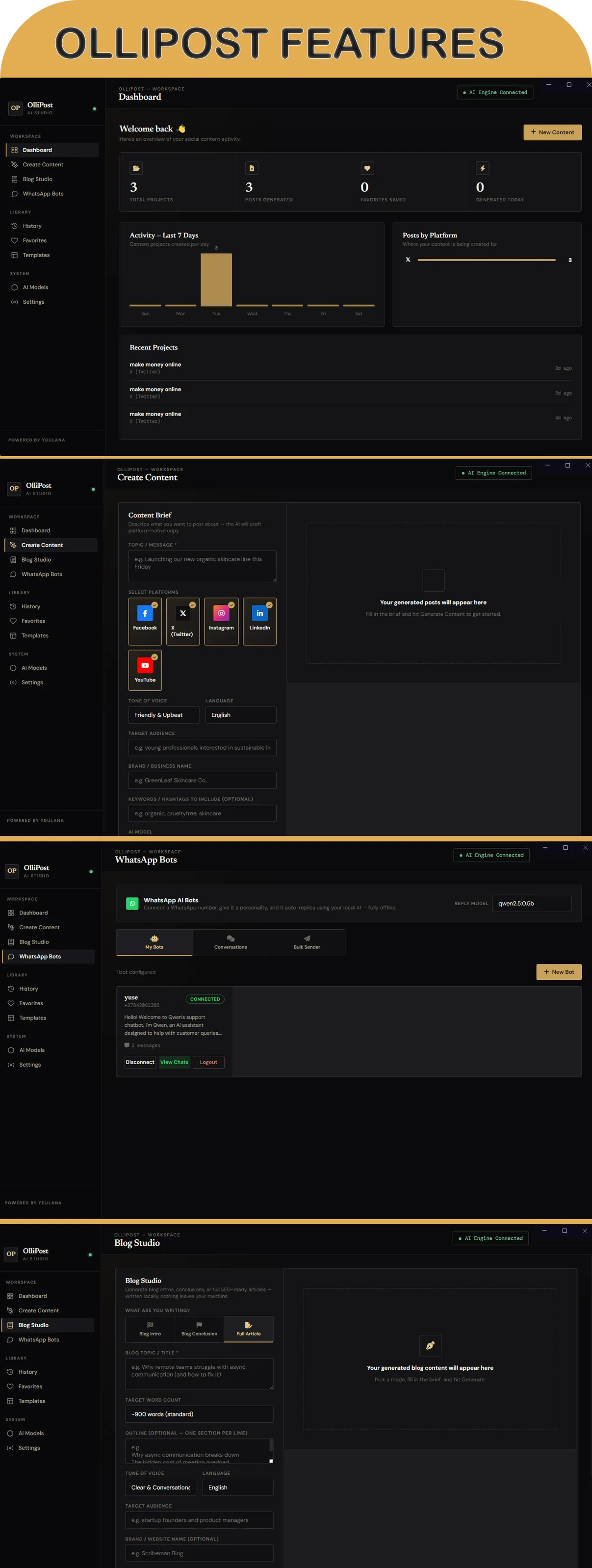
Social Media Content Generator
Generate content for:
- X / Twitter
- YouTube
Configure the generation using:
- Topic / Message
- Target Platform
- Tone of Voice
- Language
- Target Audience
- Brand / Business Name
- Keywords / Hashtags
- AI Model
The application generates platform-specific content and provides options to copy, regenerate, or save results.
Blog Studio
Create blog content using three available modes:
- Intro
- Conclusion
- Full Article
Full Article mode can generate structured blog content with:
- Suggested Meta Title
- Meta Description
- Focus Keywords
- Long-form article content
Generated blog articles can also be converted into social media posts.
WhatsApp AI Bots
Connect WhatsApp accounts and create AI-powered auto-reply bots.
Each bot can have its own:
- Bot Name
- WhatsApp Account
- AI Prompt
- Personality / Instructions
- Connection Status
WhatsApp accounts are connected using the QR-code linking process.
WhatsApp Conversations
View conversations handled by your connected WhatsApp bots.
The conversation interface displays:
- Incoming messages
- AI-generated replies
- Message timestamps
- Conversation history
WhatsApp Bulk Sender
Send a message to a list of WhatsApp numbers from a connected bot.
The bulk sender provides a live status log showing successful and failed messages.
Important: Only send messages to contacts who have opted in to receive messages and use the feature in accordance with applicable laws and WhatsApp’s terms of service.
Local AI with Ollama
OlliPost AI Studio uses Ollama as its local AI engine.
AI models are installed separately through Ollama and run on the user’s computer.
No OpenAI API key or other paid AI API is required.
After Ollama and an AI model have been installed, content generation can operate locally without an internet connection.
Internet access is still required for:
- Downloading Ollama
- Downloading AI models
- Live WhatsApp communication
AI Model Manager
The application includes an AI Models section for managing local models.
You can:
- View installed models
- Set an active model
- Delete installed models
- Install recommended models
- Install custom Ollama models
- Filter models according to hardware requirements
Example supported models include:
- Qwen 2.5 0.5B
- Llama 3.2 1B
- Gemma 2 2B
- Phi-3 Mini
- Llama 3.2 3B
- Llama 3.1 8B
- Mistral 7B
- Qwen 2.5 7B
- Code Llama 7B
- Gemma 2 9B
- DeepSeek R1 7B
- LLaVA 7B
- Phi-4 14B
- Qwen 2.5 14B
- Mixtral 8×7B
Available models depend on the Ollama model library and the user’s hardware.
System Requirements
Operating System
Required:
- Windows 10 or later
Recommended:
- Windows 11
RAM
Minimum:
- 8 GB RAM
Recommended:
- 16 GB RAM or more
Storage
Minimum:
- 5 GB free disk space for the application and a small AI model
Recommended:
- 20 GB or more free disk space when using multiple or larger AI models
AI model sizes vary, so additional storage may be required depending on the models installed.
CPU
A dedicated GPU is not required.
CPU-only AI models are supported.
For better performance with larger AI models, a modern multi-core processor is recommended.
GPU
Not required for basic usage.
A dedicated GPU is recommended for faster AI generation, especially when using larger models.
Recommended:
- Dedicated GPU
- 6 GB+ VRAM for faster generation
- More VRAM may be required for larger AI models
Internet Connection
Internet is required initially to:
- Download Ollama
- Download AI models
Once Ollama and the required AI model are installed, local AI content generation does not require an internet connection.
Internet is still required for WhatsApp messaging because WhatsApp communication depends on WhatsApp’s online service.
Recommended PC Configuration
For a comfortable experience with commonly used AI models:
- Windows 11
- 16 GB RAM
- Modern Intel Core i5
- SSD storage
- 20 GB+ available storage
For smaller AI models, the application can also run on systems without a dedicated GPU.
Performance Notes
AI generation speed depends primarily on:
- CPU performance
- GPU availability
- Available VRAM
- System RAM
- Selected AI model
- Size of the requested content
Smaller models are generally more suitable for CPU-only computers.
Larger models may require more RAM, VRAM, and storage and can take longer to generate content.
Full blog articles naturally require more processing time than short social media posts.
Dashboard
The dashboard provides an overview of your activity.
It includes:
- Total Projects
- Posts Generated
- Favorites Saved
- Generated Today
- Activity for the Last 7 Days
- Posts by Platform
- Recent Projects
History
View previously generated content projects.
You can reopen previous projects and review or reuse the generated content.
Favorites
Save individual generated posts as favorites for quick access later.
Templates
Save frequently used content briefs as templates.
Templates can store settings such as:
- Topic
- Tone
- Target Audience
- Keywords
- Other content-generation settings
Saved templates can be loaded when creating new content.
Multiple AI Models
OlliPost AI Studio allows users to install and switch between different local AI models.
This makes it possible to choose a model according to the available computer hardware and the type of content being generated.
For example:
Smaller models
Suitable for:
- CPU-only systems
- Faster short-form generation
- Lower hardware requirements
Larger models
Suitable for:
- Higher-end computers
- Systems with dedicated GPUs
- More complex or long-form generation
Installation
Installation requires the following components:
- Install OlliPost AI Studio.
- Install Ollama separately.
- Download at least one compatible AI model through Ollama.
- Open OlliPost AI STUDIO.
- Select the installed model.
- Start generating content.
WhatsApp bots can then be connected by scanning the QR code from the WhatsApp mobile application.
What Is Included
The purchase includes:
- OlliPost AI Studio Windows application
- Documentation
What Is Not Included
The following are separate components and are not bundled with the application:
- Ollama
- AI model files
Users can install Ollama and download compatible models separately.
No paid AI API subscription is included or required.
WhatsApp Requirements
WhatsApp functionality requires:
- An active WhatsApp account
- A smartphone capable of using WhatsApp
- Internet connection
- QR-code device linking
The WhatsApp account must remain available for the connected session to operate.
Bulk messaging should only be used for legitimate, permission-based communication.
Important Notes
Local AI
OlliPost AI Studio uses Ollama to run AI models locally. AI model performance varies depending on the selected model and computer hardware.
Hardware
The listed RAM and storage requirements are minimum application requirements. Larger AI models can require substantially more resources.
WhatsApp connectivity and messaging depend on WhatsApp’s service and may be affected by changes to WhatsApp’s systems or policies.
AI Output
AI-generated content should be reviewed by the user before publishing or sending.
Documentation
Detailed documentation is included with the product and covers:
- Installation
- Ollama setup
- AI model installation
- Dashboard
- Social media content generation
- Blog Studio
- WhatsApp AI Bots
- Conversations
- Bulk Sender
- History
- Favorites
- Templates
- AI Models
- Settings
- Troubleshooting
- FAQ
Support
Support is provided through the CodeCanyon item support/comments section.
Please review the documentation before contacting support, as it covers installation, AI model setup, WhatsApp connection, and common troubleshooting steps.
Summary
OlliPost AI Studio provides a single Windows application for:
- Social media content generation
- Blog content generation
- Local AI model management
- WhatsApp AI auto-replies
- WhatsApp conversation management
- WhatsApp bulk messaging
- Content history
- Favorites
- Reusable templates
The application uses locally installed AI models through Ollama and does not require a paid AI API subscription.
OlliPost AI Studio is a Windows desktop application for creating AI-assisted social media posts and blog content, and for managing WhatsApp messaging tools. It runs AI models locally through Ollama, so users can choose and manage models on their own computer. Features include content templates and history, WhatsApp auto-reply bots, conversation management, and bulk messaging. It is aimed at small businesses, marketers, freelancers, and agencies that want one desktop tool for routine content creation and customer messaging.