
Description
Money- income & expense tracker
Money is a basic income & expense tracker, a budget manager focused on simplicity. The app helps users record their daily transactions and review their financial data daily, weekly, and monthly. Adding transactions is extremely fast and fun because of the interactive animations.
The app is focused on privacy. It stores the data safely in Apple servers using iCloud and it offers secure access using technologies like Keychain, Face ID and Touch ID provided by the system (iOS/iPadOS). Unlike many other financial apps, the app doesn’t require account creation. The user “account” is the Apple ID that’s already signed into the device.
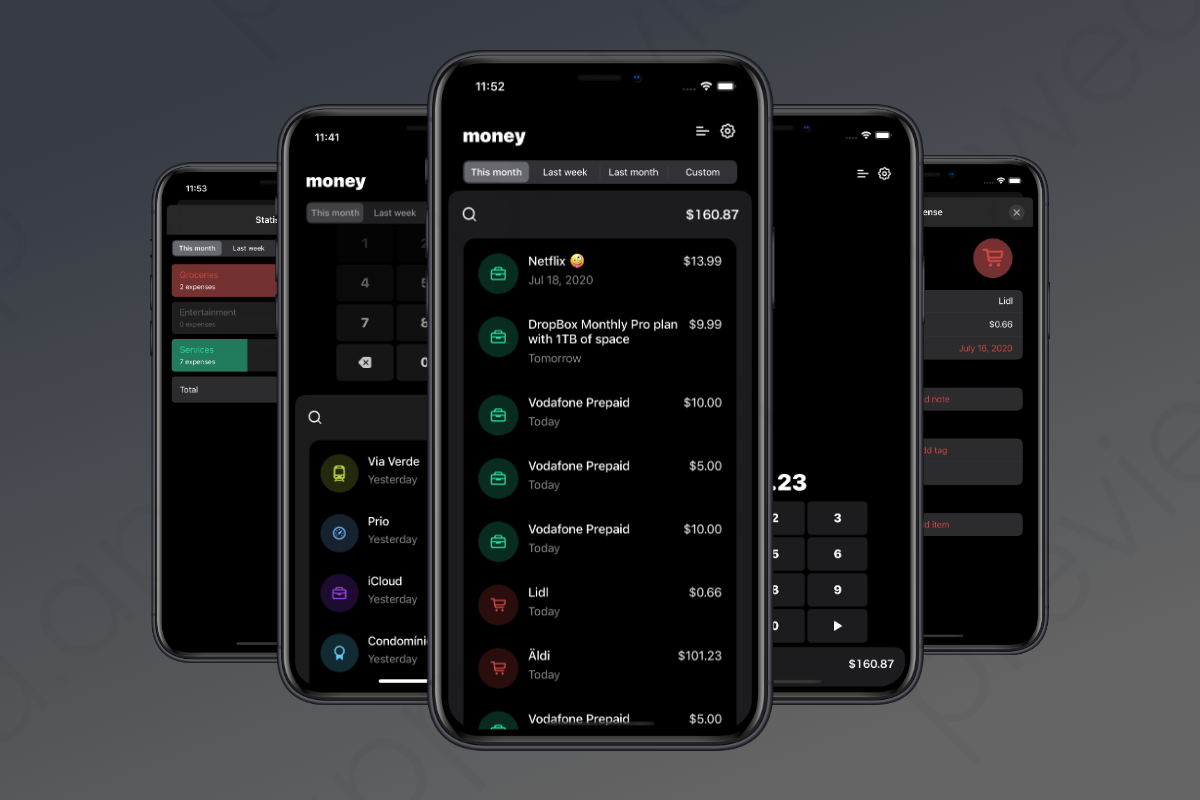
Key features
- NEW: AI Financial Analysis using ChatGPT API.
- NEW: Statistics have been updated with a new look. Now using Swift Charts.
- NEW: Source code updated for iOS 15 and 16 (Swift UI 3.0).
- Export transactions to .CSV or .JSON.
- Supports iOS 14 widgets: Financial Insights.
- Supports iOS 13 Dark Mode.
- Intuitive and easy to use interface.
- Categorize transactions and mark them using hashtags.
- Basic analytics.
- Search transactions effectively by name, notes or hashtags.
- System currency and regional settings support.
- iCloud sync support.
- Privacy-Focused.
- Dynamic type accessibility support.
- Screen lock (Keychain Passcode + Touch ID + Face ID).
- App Icon shortcut’s.
Future features
Roadmap:
- macOS and iPadOS support (WIP).
- Receipt reader using ChatGPT.
- Transaction templates.
Implementation details
- Code: the app is 7 years old and is implemented in Swift. The IDE used is Xcode.
- Architecture: follows a Reactive MVVM architecture where each screen has its own view model decoupled from the model and the view.
- Database: initially, the data was stored locally using Realm but, since we wanted to enable iCloud synchronization, we decided to upgrade the whole app and use CoreData with CloudKit support.
- Database model:
- Category (has a name, icon and color)
- Transaction (can only be assigned to one Category but can handle multiple Article’s and multiple Tag’s)
- Article (i.e.: transaction X is a Amazon purchase, then the article is what was bought:
SSD disk 512GB) - Tag (i.e.:
#vacations2020) - Localization: includes English and Portuguese, and the project is prepared to receive other translations.
- Interface: some parts of the UI is implemented using SwiftUI and others using Interface Builder.
- Dependencies:
- Swift Packages:
- SwiftDate (used to manipulate the date interval for each filter, i.e., current week based on the device time zone)
- STRegex (easy to use regular expression parser used in storing a custom date interval in the
UserDefaults) - PremierKit (a bunch of reusable system helpers)
- SwiftyAttributes (a convenience
NSAttributedStringhelper) - Dodo (used to display error messages)
- QuickActions (used to setup the app icon shortcut to create transactions)
- WSLogger (used to log messages with level of severity, i.e., debug, info, warning, error)
- WSPopup (used to show popups, flexible way to show a view to the screen)
- Test suite: the project includes unit tests and integration tests of the business logic and core functionalities.
Stack
- Swift 5.7
- SwiftUI 3.0
- Minimum deployment target is iOS 15
- iCloud
- CoreData
- Keychain
- Widgets
- Siri Intent Extension
Requirements
- Apple Developer account.
- SwiftGen v6.0 or greater.
- Xcode 14+
- iOS 15+
- ChatGPT API Key (optional)
Getting Started
- Rename
your.domain.Moneyto use your domain. (i.e.:com.razybits.Money): Money.xcodeproj/project.pbxprojMoney/CloudKit/CloudKit.swiftMoney/Constants.swiftMoney/Info.plistMoney/Money.entitlementsMoneyIntentExtension/MoneyIntentExtension.entitlementsMoneyWidgets/MoneyWidgetsExtension.entitlementsMoney/Screen Lock/SecurePasscodeStore.swift- Install SwiftGen and run
swiftgen. - Open the
Money.xcodeprojfile. - Set up Apple Developer account, change signing and entitlements based on your preferences.
We are always available to help you setting up the project. Please contact us if you are having trouble running the app in the simulator or on your iPhone.
ChatGPT
To enable the AI financial analysis, you need to assign your ChatGPT API key in the CHAT_GPT_ACCESS_TOKEN global var.
Project structure
Root:
Money
Money.xcodeproj
Money.xcworkspace
MoneyIntentExtension
MoneyTests
MoneyUITests
MoneyWidgets
MoneyWidgetsExtension.entitlements
Resources
swiftgen.yml
Source code at Money:
AppDelegate.swift
AppCoordinator.swift
AppLogger.swift
AppVersionStatus.swift
Constants.swift
Features.swift
Assets.xcassets
Colors.xcassets
MainViewController.swift
MainViewController.xib
Onboarding
Timeline
Categories
Transactions
Create Transaction
Screen Lock
Search
Settings
Statistics
User
Styles
Dialogs
Models
ViewModels
Views
Cells
CloudKit
CoreData
SwiftUI
Utilities
Info.plist
Money-Bridging-Header.h
Money.entitlements
LaunchScreen.storyboard
en.lproj
pt-PT.lproj
Live version
The app is available in the App Store. If you want to test the app before buying, then please request us a promo code.
Documentation
You can see the general information of this project at money/wiki.
The full documentation is available at money/docs.
Acknowledgements
Before purchasing
Please check the documentation before purchasing. Be aware that this app requires knowledge on Apple specific technologies. We can provide you some guidance but we won’t accept feature or enhancement requests.
Troubleshoot
Contact us if you find issues with the setup. The app has been fully tested several times but it may have bugs. If a crash occurs, we are happy to help you solve the issue. Just contact us.
Income & Expense Tracker is iOS app source code for a personal budgeting app. It lets users record income and spending, organize transactions by category or tag, search past entries, and view summaries over daily, weekly, and monthly periods. Data can be synchronized through iCloud, exported in CSV or JSON formats, and protected with a passcode, Face ID, or Touch ID. The package is intended for iOS developers, freelancers, and businesses that want a starting point for building or customizing a privacy-focused money-tracking app.